Metagenomics Pipeline Tutorial: Taxonomic Classification with Kraken2 and Nextflow on Cloud (2026)

This tutorial walks you through a complete shotgun metagenomics analysis pipeline, from raw FASTQ files to taxonomic profiles, diversity plots, and interactive reports. You will use TaxoFlow (a Nextflow-based pipeline), Kraken2 for taxonomic classification, Bracken for abundance estimation, and Thoa for managed cloud execution. No cloud infrastructure setup required.
What will you learn:
- How to run a shotgun metagenomics taxonomic profiling pipeline on cloud infrastructure
- Apply quality control and adapter trimming with FastQC and Trim Galore
- Remove host DNA removal using Bowtie2
- Perform taxonomic classification with Kraken2 and abundance re-estimation with Bracken
- Estimate α and β diversity analysis with Phyloseq
- Generate interactive plots with Krona and MultiQC
Available pipelines for metagenomics taxonomic classification
In the field of metagenomics taxonomic classification or profiling, there is an endless universe of pipelines or methodologies you can follow to explore and characterize your samples. We recommend this comprehensive review/benchmark for you to explore the different existing approaches.
For this recipe, we propose to use the pipeline TaxoFlow, a pipeline that wraps with Nextflow the protocol published by Jennifer Lu et al. (2022).
At the end, with this pipeline one can:
- inspect visually the taxonomic distribution of the microbial community present in metagenomics samples.
- establish overall differences in community composition among samples.
Basic skills
This tutorial requires basic knowledge and skills using the Command Line Interface (CLI), as well as minimum knowledge related to metagenomics concepts and purpose.
1. Input Data: Shotgun Metagenomics FASTQ Files
The example dataset we will use to demonstrate the analysis consists of paired-end reads recovered from an oligotrophic, phosphorus-deficient pond in Cuatro Ciénegas, Mexico (Okie et al., 2020) in FASTQ format. The BioProject accession number is PRJEB22811.
From this BioProject, three samples will be used: ERR2143768, ERR2143770 and ERR2143774. The files will be embedded within the repository that we will be cloning afterwards (see this section).
2. Kraken2 Database and Bowtie2 Indexed Genome Setup
This tutorial provides with an indexed genome for Bowtie2 and a really reduced Kraken2/Bracken database to execute the pipeline. However, please keep in mind that the outcomes of the pipeline are not biologically meaningful if these resources are used on real data sets. At the moment of running the workflow with your own data, you must ensure that the proper database and indexed genome are used. Thus, we hereby provided you with repositories with already pre-compiled Kraken2/Bracken databases and indexed Bowtie2 genomes for the most popular organisms.
-
Kraken2/Bracken databases: https://benlangmead.github.io/aws-indexes/k2
-
Bowtie2 indexed genomes: https://benlangmead.github.io/aws-indexes/bowtie
Also, it is possible to build your own databases and indexed genomes. You can find the tutorials here:
-
Build Kraken2 database (until step 6): https://hackmd.io/@MEC-lab-team/SyvOOB0skl
-
Additional option to customize Kraken2 database: https://avilpage.com/2024/07/mastering-kraken2-build-custom-db.html
-
Build Bowtie2 index: https://www.metagenomics.wiki/tools/bowtie2/index
3. Metagenomics Workflow: From QC to Taxonomic Profiling
The workflow uses the following processing steps: initial quality screening, read trimming, host removal, taxonomic classification, Bayesian re-estimation of species abundance, and generation of plots and metrics.
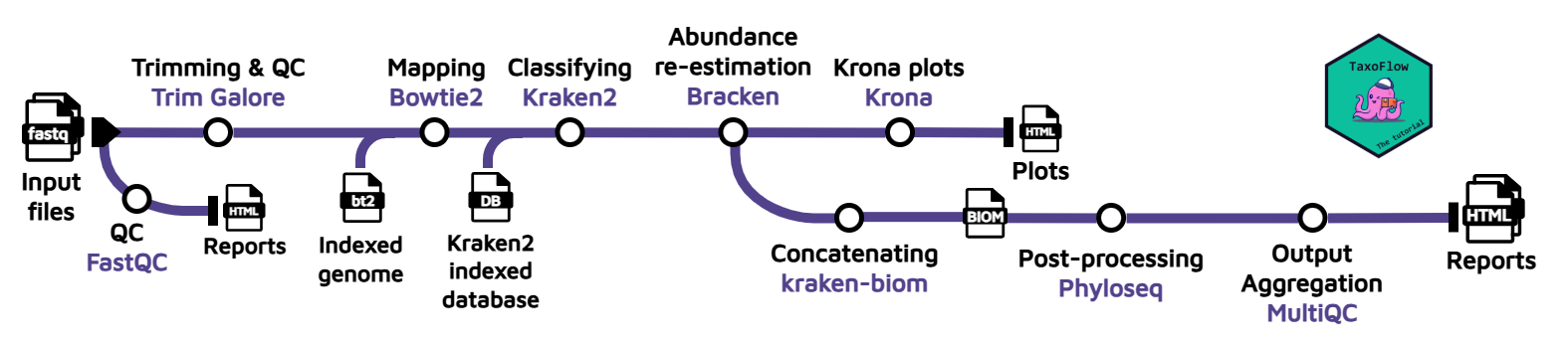
To perform these steps, we will use the following tools:
Tools used:
Tools and purpose
| Step | Tool | Purpose |
|---|---|---|
| Quality control | FastQC | Assess raw read quality |
| Trimming | Trim Galore (Cutadapt) | Remove adapters and low-quality bases |
| Host removal | Bowtie2 | Filter out host genome reads |
| Classification | Kraken2 | Taxonomic assignment of reads |
| Abundance | Bracken | Bayesian species abundance re-estimation |
| Visualization | Krona | Interactive taxonomic abundance charts |
| Multi-sample | kraken-biom + Phyloseq | Diversity analysis (α, β) and reporting |
| Report | MultiQC | Aggregated QC report across all samples |
| Orchestration | Nextflow (TaxoFlow) | Pipeline workflow management |
| Cloud execution | Thoa | Managed cloud compute, zero DevOps |
- Quality control on the read data before trimming using FastQC.
- Trimming adapter sequences and perform QC after trimming using Trim Galore (bundles Cutadapt and FastQC).
- Host removal with Bowtie2 by aligning the reads against an indexed reference genome.
- Taxonomic classification with Kraken2. This tool relies on an indexed database that can be downloaded. Here, we will use the custom database with 54 bacterial species that we have selected only for the purpose of this tutorial. However, you can expand the annotation simply by switching to another database.
- Bayesian re-estimation of species abundance with Bracken. This software is designed to compute species abundance using Kraken classification results as described in the reference paper. It also uses some files contained in the database folders such as the kmer distribution files. This is a fairly complex analysis, but you don’t need to know the details in order to follow this tutorial; you can learn about how the method works afterwards.
- Plot generation with Krona from the Bracken output. This will allow us to visualize interactively the relative abundance of each annotated species.
- (Multi-sample) Concatenation with kraken-biom. If multiple samples are provided, the Bracken reports will be concatenated and converted into a Biological Observation Matrix (BIOM) file.
- (Multi-sample) Generation of final report with Phyloseq. The BIOM file will be converted to a Phyloseq object, and this object will be further processed to generate absolute plots, estimate both α and β-diversity and perform a network analysis. This information will be presented in a final
report.html. To learn more about the code used to generate the plots and metrics, check out this Phyloseq tutorial. - (Multi-sample) Compilation of multiple tool outputs through MultiQC. The outputs from FastQC, Trim Galore and Kraken2 are aggregated into a single, comprehensive and interactive report.
The specific versions used by Taxoflow for each tool are as follows:
Specific software versions
| Tool | Version | Container* (Seqera**) | License |
|---|---|---|---|
| fastQC | 0.12.1 | trim-galore:0.6.10–1bf8ca4e1967cd18 | GPL-3.0 |
| Trim Galore | 0.6.10 | trim-galore:0.6.10–1bf8ca4e1967cd18 | GPL-3.0 |
| Bowtie2 | 2.5.4 | bowtie2:2.5.4–d51920539234bea7 | GPL-3.0 |
| Kraken2 | 2.14 | kraken2:2.14–83aa57048e304f01 | MIT |
| Bracken | 3.1 | bracken:3.1–22a4e66ce04c5e01 | GPL-3.0 |
| KrakenTools | 1.2 | krakentools:1.2–db94e0b19cfa397b | GPL-3.0 |
| Krona | 2.8.1 | krona:2.8.1–2f750080982f027e | BSD |
| Kraken-BIOM | 1.2.0 | kraken-biom:1.2.0–f040ab91c9691136 | MIT |
| R | 4.4.3 | bioconductor-phyloseq_knit_r-base_r-ggplot2_r-rmdformats:6efceb52eb05eb44 | GPL-2,3 |
| Phyloseq | 1.50.0 | bioconductor-phyloseq_knit_r-base_r-ggplot2_r-rmdformats:6efceb52eb05eb44 | AGPL-3 |
| ggplot2 | 3.5.1 | bioconductor-phyloseq_knit_r-base_r-ggplot2_r-rmdformats:6efceb52eb05eb44 | MIT |
| MultiQC | 1.33 | pip_multiqc:a3c26f6199d64b7c | GPL-3.0 |
* Containers found at: community.wave.seqera.io/library/
** Containers compatible with Docker engine.
Pipeline and tools license
Please keep in mind that TaxoFlow is released under an open-source license (CC0 1.0) for the benefit of the community. However, the encompassed tools feature different licenses that may affect your further implementation of TaxoFlow, and hence we encourage you to review carefully the terms of each individual license.
Pipeline validation
TaxoFlow was used to analyze the sequences SRR32316197 belonging to the mock community (ZymoBIOMICS™ Microbial Community DNA Standard D6305) in combination with the Kraken2 database PlusPFP (Standard plus Refseq protozoa, fungi & plant) v04/09/2024. This analysis shows the correct estimation of the community member proportions according to the manufacturer specifications. The resulting files of this analysis were deposited on Zenodo under the identifier 16947911 and with the filename mock_community.tar.gz.
4. Code and data preparation
In order to launch the pipeline for the analysis, we need:
- Clone the TaxoFlow repository.
- Download the database and indexed genome.
- Write the script to or command to launch the job in Thoa.
4.1 Clone the repository
Run the following command on your Linux/Mac/WSL terminal:
Terminal
git clone https://github.com/jeffe107/TaxoFlow
cd TaxoFlow
4.2 Download Kraken2 database
Once within the working directory, run the following commands to download the Kraken2 database:
Terminal
mkdir -p data/krakendb && cd "$_"
wget --no-check-certificate --no-proxy 'https://zenodo.org/api/records/17708950/files/krakendb.tar.gz/content'
tar -xvzf content
rm -r content
cd -
Kraken2 database
Please remember that this is a minimal implementation of the Kraken2 database. For your real analysis, you will need to download a proper one. Please see this section.
4.3 Download indexed genome for Bowtie2
Let’s execute the following commands to download an indexed genome to exclude specific reads from the analysis:
Terminal
mkdir -p data/genome && cd "$_"
wget --no-check-certificate --no-proxy 'https://genome-idx.s3.amazonaws.com/bt/TAIR10.zip'
unzip TAIR10.zip
rm -r TAIR10.zip
cd -
Bowtie2 indexed genomes
We are using the Arabidopsis thaliana genome assembly TAIR10 (only for the purpose of this tutorial) that has been already indexed. There exist more indexed genomes available here or you can build your own index.
4.4 Directory inspection
This the resulting directory structure, required to launch the analysis:
Code and data
.
├── bin
│   └── report.Rmd
├── data
│   ├── genome
│   │   └── TAIR10
│   │       ├── TAIR10.1.bt2
│   │       ├── TAIR10.2.bt2
│   │       ├── TAIR10.3.bt2
│   │       ├── TAIR10.4.bt2
│   │       ├── TAIR10.dict
│   │       ├── TAIR10.manifest.json
│   │       ├── TAIR10.rev.1.bt2
│   │       └── TAIR10.rev.2.bt2
│   ├── krakendb
│   │   ├── database250mers.kmer_distrib
│   │   ├── database250mers.kraken
│   │   ├── database.kraken
│   │   ├── hash.k2d
│   │   ├── names.dmp
│   │   ├── nodes.dmp
│   │   ├── opts.k2d
│   │   ├── seqid2taxid.map
│   │   └── taxo.k2d
│   ├── samples
│   │   ├── ERR2143768
│   │   │   ├── ERR2143768_1.fastq.gz
│   │   │   └── ERR2143768_2.fastq.gz
│   │   ├── ERR2143770
│   │   │   ├── ERR2143770_1.fastq.gz
│   │   │   └── ERR2143770_2.fastq.gz
│   │   └── ERR2143774
│   │       ├── ERR2143774_1.fastq.gz
│   │       └── ERR2143774_2.fastq.gz
│   └── samplesheet.csv
├── main.nf
├── modules
│   ├── bowtie2.nf
│   ├── bracken.nf
│   ├── fastqc.nf
│   ├── knit_phyloseq
│   │   ├── environment.yml
│   │   └── knit_phyloseq.nf
│   ├── kraken2.nf
│   ├── kraken_biom.nf
│   ├── kReport2Krona.nf
│   ├── ktImportText.nf
│   ├── multiqc.nf
│   └── trimgalore.nf
├── nextflow.config
└── taxoflow.nf
This a summarized description of the files and directories found:
main.nfis the file we are going to invoke with the world-famousnextflow runcommand.taxoflow.nfis where all the magic happens, it stores the order of execution of tasks and how data should be handled.nextflow.config: it manages different directives for workflow execution.modulesis a really important folder since here we find dedicated files per each process of the pipeline.binis the directory where we store customized scripts that can be run within a given process.datacontains input data and related resources:- An indexed genome within the
genomefolder representing the host genome to which we want to map the reads for contamination removal. - krakendb is a directory that contains the Kraken2 database necessary for both taxonomic annotation and species abundance re-estimation.
- samplesheet.csv lists the IDs and paths of the example data files, for processing in batches.
- samples directory is where the raw sequences are stored. The names correspond to accession numbers that you can search on the Sequence Read Archive
- An indexed genome within the
5. Running the Metagenomics Pipeline on Thoa
Authentication or API access
Please remember that you first need to authenticate (log in) in the Thoa platform or export the variable to access Thoa through the API service. More information here.
We are ready to execute the pipeline as we have everything that is required by TaxoFlow. The command is as follows:
Terminal
thoa run \
--cmd "nextflow self-update && nextflow run main.nf -profile conda --sheet_csv 'data/samplesheet.csv'" \
--input ./ \
--tools "nextflow,openjdk" \
--n-cores 16 \
--ram 32 \
--storage 64 \
--download-dir output \
--output "./output" \
--disable-preflight \
--strict
Let’s break down everything found in this command:
-
--cmdrepresents the actual command to execute the pipeline once the VM is created. It contains two commands:1.1
nextflow self-update: this allows to update the Nextflow version provided within the VM. It helps to avoid version conflicts.1.2
nextflow run main.nf -profile conda --sheet_csv 'data/samplesheet.csv': the proper command to run the pipeline within the pipeline.Hidden parameters
Keep in mind that there are “hidden” parameters like the output directory and the paths to the database and indexed genome, among others. These can be modified via the
nextflow.configfile. Alternatively, you can override these parameters via CLI:Terminal
nextflow run main.nf \
-profile conda \
--sheet_csv 'path/to/sheetCSV' \
--bowtie2_index /path/to/indexedGenome \
--kraken2_db /path/to/krakendb \
--read_length N
For more information about this, please visit the TaxoFlow tutorial.
Your data
In this execution, the input data is specified via
data/samplesheet.csv. This file contains the sample names, along with the paths to the files. Please create a simlar file for your data, and it is highly advisable that you place your data inside the pipeline directory as this allows you to use a single--inputparameter for thethoacommand. -
--input: since this is a custom pipeline, we need to upload everything within the working directory to be usable within the VM created by Thoa. Please note that once uploaded, Thoa will identify files already used, avoiding duplication of files uploaded. Only modified or new files will be uploaded. --tools: these are the required tools (or dependencies) for the execution of the pipeline. In this case, we need Nextflow along with its “grandpa”, Java.--n-cores,--ramand--storage: these parameters indicate what resources you need for your VM. RAM and storage are specified in GB.--download-dir: this is the local directory where we want to store everything that is downloaded from the VM.
Output directory
This directory should be created beforehand!
--output: this is the directory where all the ouput files will be stored, and thus the one we are interested in. The nameoutputis specified in thenextflow.configfile.--disable-preflight: this skips the AI preflight check that reviews your script/environment before the job starts.--strict: this disables AI auto-retries, the job will not be automatically diagnosed or retried if it fails.
5.1 Important aspects
- Currently only Conda is available as package manager in Thoa. Thus, the pipeline relies on Conda environments to execute the different tools that are enclosed in the workflow. Luckily, Nextflow has built-in support for Conda environments; TaxoFlow already includes a Conda environment per tool.
- Following on the previous item, Thoa is able to reuse the created environments for new executions of the pipeline, optimizing the runtime. Please visit this section to know how to re-use alredy created environments.
- Nextflow pipelines run as a single Thoa job: all steps execute sequentially within that job’s allocated resources. We are actively working on native Nextflow integration that will split individual workflow steps into separate Thoa jobs, with each step visible, linkable, and independently re-runnable in the Thoa interface.
6. Monitoring and Troubleshooting Your Pipeline Run
When you launch any job in Thoa, you will see the following information:
Launching jobs in Thoa
╭────────────────────────────────────────── Job Configuration ──────────────────────────────────────────╮
│  Inputs              ['./']                                                                           │
│  Input Dataset       None                                                                             │
│  Outputs             /home/jeffe107/thoa_test/TaxoFlow/multi/output                                   │
│  Number of Cores     16                                                                               │
│  RAM                 32 GB                                                                            │
│  Storage             64 GB                                                                            │
│  Tools               nextflow,openjdk                                                                 │
│  Environment Source  None                                                                             │
│  Command             nextflow self-update && nextflow run main.nf --sheet_csv 'data/samplesheet.csv'  │
│  Download Path       /home/jeffe107/thoa_test/TaxoFlow/multi/output                                   │
│  Run Async           False                                                                            │
│  Job Name            None                                                                             │
│  Job Description     None                                                                             │
│  Dry Run             False                                                                            │
│  Verbose             False                                                                            │
╰───────────────────────────────────────────────────────────────────────────────────────────────────────╯
⠀⡐ Starting Job Submission Workflow
Once the job has started you should start to see how Nextflow is launching each task within the VM. This is an example in a compacted manner of what you should see (it may differ from what you actually see since the job is interactive):
TaxoFlow execution
N E X T F L O W   ~  version 25.10.4

Launching `main.nf` [stoic_miescher] DSL2 - revision: 8f65b983e6

    ___________________________________________________________________________________________________
    ___________________________________________________________________________________________________
    >===>>=====>                                 >=======>  >=>
        >=>                                      >=>        >=>
        >=>        >=> >=>  >=>   >=>    >=>     >=>        >=>    >=>     >=>      >=>
        >=>      >=>   >=>    >> >=>   >=>  >=>  >=====>    >=>  >=>  >=>   >=>  >  >=>
        >=>     >=>    >=>     >>     >=>    >=> >=>        >=> >=>    >=>  >=> >>  >=>
        >=>      >=>   >=>   >>  >=>   >=>  >=>  >=>        >=>  >=>  >=>   >=>>  >=>=>
        >=>       >==>>>==> >=>   >=>    >=>     >=>       >==>    >=>     >==>    >==>

    ___________________________________________________________________________________________________
    ___________________________________________________________________________________________________

executor >  local (24)
[1f/176196] TaxoFlow:FASTQC (ERR2143768)            [100%] 3 of 3 ✔
[c5/42b877] TaxoFlow:TRIM_GALORE (ERR2143774)       [100%] 3 of 3 ✔
[da/6ba52f] TaxoFlow:BOWTIE2 (ERR2143774)           [100%] 3 of 3 ✔
[45/054c41] TaxoFlow:KRAKEN2 (ERR2143774)           [100%] 3 of 3 ✔
[30/94f39e] TaxoFlow:BRACKEN (ERR2143774)           [100%] 3 of 3 ✔
[67/1dabc3] TaxoFlow:K_REPORT_TO_KRONA (ERR2143774) [100%] 3 of 3 ✔
[ed/8bf05a] TaxoFlow:KT_IMPORT_TEXT (ERR2143774)    [100%] 3 of 3 ✔
[b2/cfd842] TaxoFlow:KRAKEN_BIOM (merge_samples)    [100%] 1 of 1 ✔
[cb/815f36] TaxoFlow:KNIT_PHYLOSEQ (knit_phyloseq)  [100%] 1 of 1 ✔
[7f/b77259] TaxoFlow:MULTIQC (All samples)          [100%] 1 of 1 ✔

Completed at: 27-Nov-2025 13:03:40
Duration    : 1m 36s
CPU hours   : (a few seconds)
Succeeded   : 10
In the case that your job fails, you can remove the --disable-preflight and --strict parameters from your launching command in order to receive AI assistance during the initial execution and retries.
Regarding Nextflow, the most common fail causes are among:
- Paths to the files: please make sure that the files are within the
--inputdirectory. - Missing files: in the case of TaxoFlow, keep in mind that it requires both the database and the indexed genome to be executed properly.
- Conda: please remember that currently only Conda is available as software manager for Nextflow execution. Hence, if the pipeline lacks of the proper Conda environments for each process, it will fail.
7. Output Files and Directory Structure
When the job is finished, Thoa will download all the files within the output directory. This is a glimpse of how it should look like:
Output data
output/
├── biom
│   └── merged.biom
├── bowtie2
│   ├── ERR2143768.1
│   ├── ERR2143768.2
│   ├── ERR2143768_aln_sum.log
│   ├── ERR2143768.sam
│   ├── ERR2143770.1
│   ├── ERR2143770.2
│   ├── ERR2143770_aln_sum.log
│   ├── ERR2143770.sam
│   ├── ERR2143774.1
│   ├── ERR2143774.2
│   ├── ERR2143774_aln_sum.log
│   └── ERR2143774.sam
├── bracken
│   ├── ERR2143768.bracken
│   ├── ERR2143768.breport
│   ├── ERR2143770.bracken
│   ├── ERR2143770.breport
│   ├── ERR2143774.bracken
│   └── ERR2143774.breport
├── fastqc
│   ├── ERR2143768_1_fastqc.html
│   ├── ERR2143768_1_fastqc.zip
│   ├── ERR2143768_2_fastqc.html
│   ├── ERR2143768_2_fastqc.zip
│   ├── ERR2143770_1_fastqc.html
│   ├── ERR2143770_1_fastqc.zip
│   ├── ERR2143770_2_fastqc.html
│   ├── ERR2143770_2_fastqc.zip
│   ├── ERR2143774_1_fastqc.html
│   ├── ERR2143774_1_fastqc.zip
│   ├── ERR2143774_2_fastqc.html
│   └── ERR2143774_2_fastqc.zip
├── kraken2
│   ├── ERR2143768.k2report
│   ├── ERR2143768.kraken2
│   ├── ERR2143770.k2report
│   ├── ERR2143770.kraken2
│   ├── ERR2143774.k2report
│   └── ERR2143774.kraken2
├── krona
│   ├── ERR2143768.krona.html
│   ├── ERR2143770.krona.html
│   └── ERR2143774.krona.html
├── multiqc
│   ├── all_samples_data
│   │   ├── bowtie2_pe_plot.txt
│   │   ├── cutadapt_filtered_reads_plot.txt
│   │   ├── cutadapt_trimmed_sequences_plot_3_Counts.txt
│   │   ├── cutadapt_trimmed_sequences_plot_3_Obs_Exp.txt
│   │   ├── fastqc_adapter_content_plot.txt
│   │   ├── fastqc_per_base_n_content_plot.txt
│   │   ├── fastqc_per_base_sequence_quality_plot.txt
│   │   ├── fastqc_per_sequence_gc_content_plot_Counts.txt
│   │   ├── fastqc_per_sequence_gc_content_plot_Percentages.txt
│   │   ├── fastqc_per_sequence_quality_scores_plot.txt
│   │   ├── fastqc_sequence_counts_plot.txt
│   │   ├── fastqc_sequence_duplication_levels_plot.txt
│   │   ├── fastqc_sequence_length_distribution_plot.txt
│   │   ├── fastqc-status-check-heatmap.txt
│   │   ├── fastqc_top_overrepresented_sequences_table.txt
│   │   ├── kraken-top-duplication_plot.txt
│   │   ├── kraken-top-n-plot_Class.txt
│   │   ├── kraken-top-n-plot_Domain.txt
│   │   ├── kraken-top-n-plot_Family.txt
│   │   ├── kraken-top-n-plot_Genus.txt
│   │   ├── kraken-top-n-plot_Kingdom.txt
│   │   ├── kraken-top-n-plot_Order.txt
│   │   ├── kraken-top-n-plot_Phylum.txt
│   │   ├── kraken-top-n-plot_Species.txt
│   │   ├── kraken-top-n-plot_Unclassified.txt
│   │   ├── llms-full.txt
│   │   ├── multiqc_bowtie2.txt
│   │   ├── multiqc_citations.txt
│   │   ├── multiqc_cutadapt.txt
│   │   ├── multiqc_data.json
│   │   ├── multiqc_fastqc.txt
│   │   ├── multiqc_general_stats.txt
│   │   ├── multiqc_kraken.txt
│   │   ├── multiqc.log
│   │   ├── multiqc.parquet
│   │   ├── multiqc_software_versions.txt
│   │   └── multiqc_sources.txt
│   └── all_samples.html
├── performanceReport.html
├── taxoReport.html
└── trimming
    ├── ERR2143768_1.fastq.gz_trimming_report.txt
    ├── ERR2143768_1_val_1_fastqc.html
    ├── ERR2143768_1_val_1_fastqc.zip
    ├── ERR2143768_1_val_1.fq.gz
    ├── ERR2143768_2.fastq.gz_trimming_report.txt
    ├── ERR2143768_2_val_2.fq.gz
    ├── ERR2143770_1.fastq.gz_trimming_report.txt
    ├── ERR2143770_1_val_1_fastqc.html
    ├── ERR2143770_1_val_1_fastqc.zip
    ├── ERR2143770_1_val_1.fq.gz
    ├── ERR2143770_2.fastq.gz_trimming_report.txt
    ├── ERR2143770_2_val_2.fq.gz
    ├── ERR2143774_1.fastq.gz_trimming_report.txt
    ├── ERR2143774_1_val_1_fastqc.html
    ├── ERR2143774_1_val_1_fastqc.zip
    ├── ERR2143774_1_val_1.fq.gz
    ├── ERR2143774_2.fastq.gz_trimming_report.txt
    └── ERR2143774_2_val_2.fq.gz
Please feel free to remove any non-necessary file for you. However, for the aim of reproducibility, you should keep intermediate files.
8. Interpreting Taxonomic Profiles and Diversity Metrics
Interpretation
Please remember that this is a mock execution of the pipeline, and therefore it doesn’t have a clear biological interpretation. To extract truly insights from the samples hereby provided or your own data, you need to use the corresponding indexed and Kraken2/Bracken databases for you analysis purposes.
The most important files for the analysis are the taxoReport.html and multiqc/all_samples.html. These two files contain the exploratory analysis of the samples, including reads mapped against the reference genome, taxonomic classification and abundance, α-diversity and β-diversity measurements, among others. The following is an example of one of the plots present in the taxoReport.html.
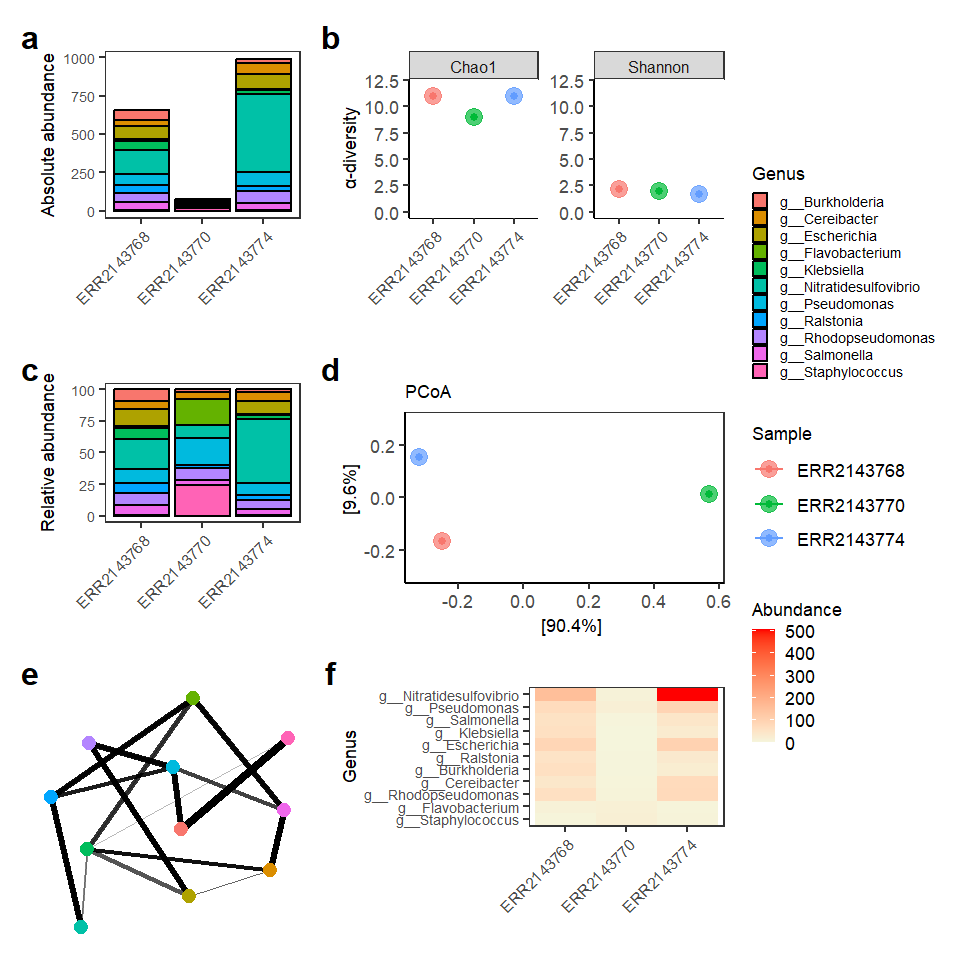
Taxonomic composition and diversity analyses of metagenomic samples. Absolute (a) and relative (c) abundance plots show the distribution of dominant genera across samples. α-diversity (b) was estimated using Chao1 and Shannon indices. β-diversity (d) was assessed by Principal Coordinates Analysis (PCoA) using Bray–Curtis distance. A co-occurrence network (e) shows relationships among genera based on Bray–Curtis similarity (maxdist = 0.9). A heatmap (f) displays genus abundance patterns across samples, ordered according to Bray–Curtis dissimilarity and PCoA. Low-abundance genera (<3% mean relative abundance) were removed before diversity and network analyses.
Finally, the biom/merged.biom file can be used for further analysis in R and through packages like Phyloseq or mia; you may want to check this tutorial for downstream statistical analysis.
Frequently Asked Questions
- How long does this metagenomics pipeline take to run?
With the example dataset (3 samples) on Thoa with 16 cores and 32GB RAM, the pipeline completes in under 2 minutes. Real datasets with full Kraken2 databases will take longer depending on sample size and database complexity, typically 30 minutes to several hours per sample.
- Can I use this pipeline with my own samples?
Yes. Replace the example FASTQ files with your own, update the samplesheet.csv, and point the pipeline at a full Kraken2 database appropriate for your study organism. The tutorial uses a reduced database for speed — see Section 2 for links to production databases.
- Do I need to install Nextflow or Kraken2 on my machine?
No. Thoa handles all software installation through Conda environments. You only need the Thoa CLI installed locally to submit the job. All bioinformatics tools run on the cloud VM that Thoa provisions for you.
- What’s the difference between Kraken2 and Bracken?
Kraken2 assigns each read to a taxonomic lineage. Bracken then takes those assignments and re-estimates species-level abundance using a Bayesian model, which corrects for reads that could map to multiple species. Using both together gives more accurate abundance profiles than Kraken2 alone.
References and resources
- LangerBE, AmaralA, BaudementM-O, et al. Empowering bioinformatics communities with Nextflow and nf-core. Genome Biol., 2025; 26(1): 228. doi:10.1186/s13059-025-03673-9.
- LuJ, RinconN, WoodDE, et al. Metagenome analysis using the Kraken software suite. Nat. Protoc., 2022; 17(12): 2815–2839. doi:10.1038/s41596-022-00738-y.
- OkieJG, Poret-PetersonAT, LeeZMP, et al. Genomic adaptations in information processing underpin trophic strategy in a whole-ecosystem nutrient enrichment experiment. eLife, 2020; 9: e49816. doi:10.7554/eLife.49816.
- Yepes-GarcíaJ, FalquetL. TaxoFlow: a step-by-step tutorial to build a nextflow pipeline for metagenomics taxonomic classification, Gigabyte, 2026: 187. doi:10.46471/gigabyte.187.
- Zirión-MartínezC, Garfias-GallegosD, Arellano-FernandezTV, et al. A data carpentry-style metagenomics workshop. J. Open Source Educ., 2024; 7(72): 209. doi:10.21105/jose.00209.
Credit
Recipe developed by Jeferyd Yepes García, PhD in Bioinformatics, University of Fribourg. 4+ years of experience building pipelines and bioinformatics research.
Support
Thoa support: hello@thoa.io
Related links
-
What Is Nextflow? A Practical Guide
-
Nextflow vs Snakemake: Which Should You Use?