Pangenomics Pipeline Tutorial: Building a Pangenome Graph of the Yeast Chromosome VIII with nf-core/pangenome and Thoa on Cloud (2026)

This recipe walks you through a complete pangenomics analysis pipeline, from a collection of haplotypes in a single FASTA file to a variation graph, its statistics, 1D/2D visualizations and an interactive report. You will use nf-core/pangenome (an nf-core best-practice pipeline built on Nextflow), wfmash for the all-versus-all alignment, seqwish, smoothxg and gfaffix to build a clean graph, odgi to characterize and lay it out, and Thoa for managed cloud execution. No cloud infrastructure setup required.
The worked example is a real one: chromosome VIII of seven Saccharomyces cerevisiae strains. One of those seven, the Malaysian strain UWOPS034614, carries a documented large structural rearrangement: a ~390 kb block translocated in from chromosome VII (Tattini et al. 2019). Built from chromosome VIII alone, that block shows up as a large private insertion unique to that one strain. As a result, it’s a real, measurable structural variant sitting in the graph alongside the SNPs.
What will you learn:
- How to run a pangenomics pipeline for graph construction on Thoa cloud infrastructure
- Prepare a collection of haplotypes for graph building with bgzip, samtools and PanSN-style sequence names
- Perform all-versus-all sparse alignments with wfmash and induce a variation graph with seqwish
- Smooth the graph and remove redundant nodes with smoothxg and gfaffix
- Estimate graph statistics and generate 1D and 2D visualizations with odgi
- Aggregate every metric into a single MultiQC report
- Read a finished graph: how much sequence is shared, how much is private, and where the structural variants are
nf-core/pangenome
nf-core/pangenome is a Nextflow pipeline that builds a pangenome graph: a single graph that encodes the joint sequence variation of many genomes.
For this recipe, we propose to use the pipeline nf-core/pangenome, a Nextflow port of PGGB that follows the nf-core framework and can therefore distribute the heavy all-versus-all alignment step across many machines.
At the end, with this pipeline one can:
- encode the joint sequence variation of many genomes into a single, self-contained graph.
- inspect which regions are conserved, which are variable, and in which haplotypes each variant is found.
- quantify the topology of the resulting graph (size, linearity, connectivity) to decide whether the graph is fit for downstream analyses.
Basic skills
This tutorial requires basic knowledge and skills using the Command Line Interface (CLI), as well as minimum knowledge related to pangenomics concepts and purpose.
1. Input Data: A Collection of Haplotypes in FASTA Format
The example dataset is the yeast panel that the pangenome community uses to test and benchmark graph construction tools, distributed with PGGB’s evaluation pipeline pgge named as data/yeast/cerevisiae.pan.fa.gz: the whole genomes of seven S. cerevisiae strains (112 sequences, 16 chromosomes each), named <sample>.chr<Roman>, for a total of 23.6 MB (compressed).
A pangenome graph is not built from a whole genome at once in this tutorial, but from one chromosome of those seven strains: chromosome VIII, 4,022,338 bp of sequence in total, one haplotype per strain.
| Strain | Population / lineage | chrVIII length |
|---|---|---|
S288C |
Reference laboratory | 581,049 |
DBVPG6765 |
Wine / European | 533,397 |
UWOPS034614 |
Malaysian | 738,767 |
Y12 |
Sake / Japanese | 547,529 |
YPS128 |
North American | 543,240 |
SK1 |
Laboratory (mosaic) | 542,723 |
DBVPG6044 |
West African | 535,633 |
| Total | 7 strains, 1 haplotype | 4,022,338 |
Chromosome VIII
Why chromosome VIII? It is not a random choice. The Malaysian strain UWOPS03-461.4 (here UWOPS034614) carries an interchromosomal rearrangement in which chromosomes VII, VIII, X, XI and XIII are heavily reshuffled, an event the authors of the long-read survey of 12 strains describe as a “massive rearrangement” that cannot be explained by independent reciprocal translocations and resembles a chromothripsis-like catastrophe (Yue et al., 2017). Malaysian isolates are indeed among the most rearranged genomes known, with about 14 translocations each O’Donnell et al., 2023.
The consequence for this recipe is concrete: the graph of chrVIII will contain a real, multi-hundred-kilobase structural bubble, not only SNPs and small indels. You will see it in the statistics (section 8) and in the 1D visualization, and you will be able to point at the strain that carries it.
2. Input Preparation: Subsetting, Compression, Indexing and Sequence Naming
The whole input of the pipeline is a single FASTA file containing all the sequences to be included in the pangenome, and it must be “bgzipped”. Before running the pipeline, we need to extract the selected chromosome, and give the sequences names the pipeline (and the downstream tools) can interpret.
First, keep only chromosome VIII. The compressed panel is read with zcat and awk decides, for every record, whether it belongs to the chromosome of interest:
Terminal
wget https://raw.githubusercontent.com/pangenome/pgge/master/data/yeast/cerevisiae.pan.fa.gz
zcat cerevisiae.pan.fa.gz | awk '/^>/{keep = ($0 ~ /chrVIII/)} keep' > cerevisiae.chrVIII.fa
Second, rename the sequences following the PanSN specification, which encodes sample, haplotype and contig in the FASTA header:
[sample_name]#[haplotype_id]#[contig_or_scaffold_name]
PanSN-spec naming scheme
For instance, HG002#1#ctg1234 names the contig ctg1234 of the first haplotype of HG002.
The panel we downloaded uses <sample>.chr<Roman>, which is perfectly readable but hides the haplotype, so a single sed turns S288C.chrVIII into S288C#1#chrVIII:
Terminal
sed -E 's/^>([^.#]+)[.#](chrVIII)/>\1#1#\2/' cerevisiae.chrVIII.fa | bgzip -c > cerevisiae.chrVIII.pansn.fa.gz
Each strain, for this recipe, is a single assembled chromosome, so it is a single phase group and gets the haplotype id 1.
Proper naming
Naming matters: steps such as vg deconstruct parse these fields to assign variants to samples and phases, and outputs are otherwise wrong or not produced at all.
3. Pangenomics Workflow: From All-versus-All Alignment to Graph QC
The workflow uses the following processing steps: input validation and indexing, all-versus-all alignment, graph induction, graph smoothing, redundancy removal, graph construction, and generation of statistics, visualizations and a final report.
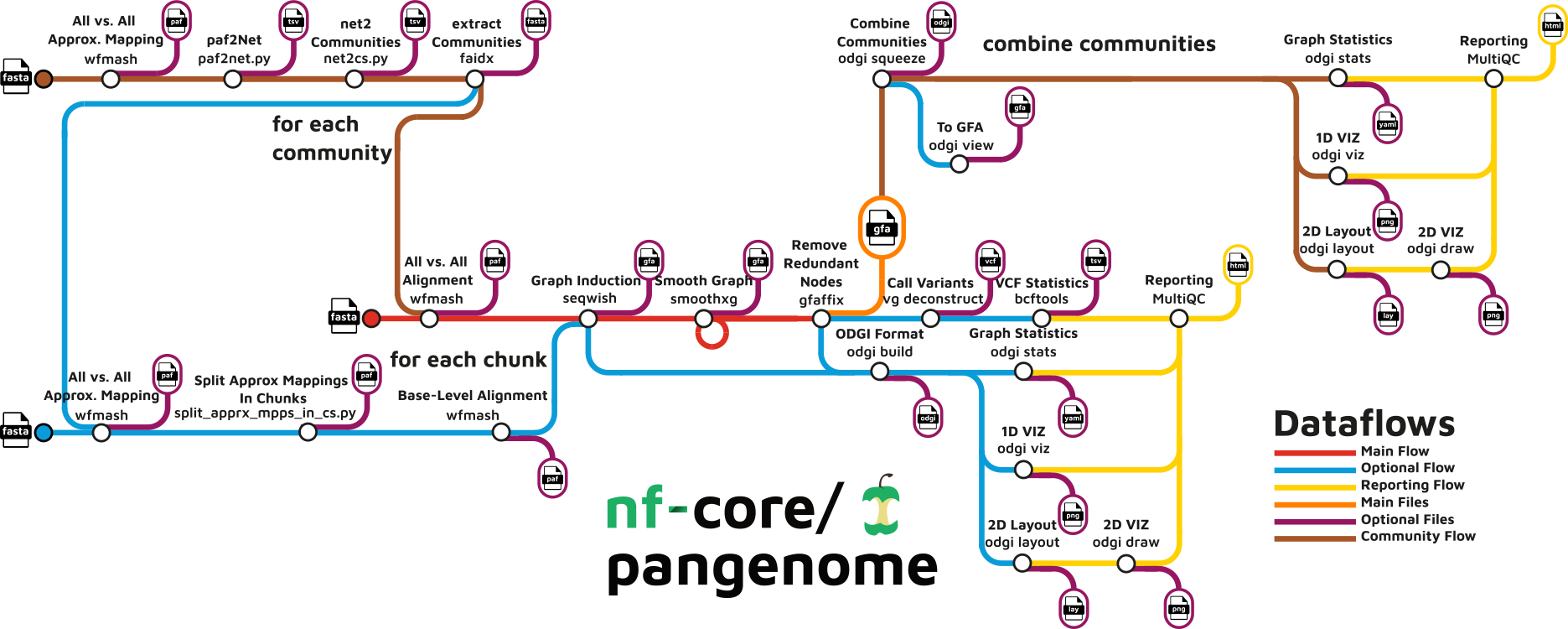
Diagram of the nf-core/pangenome workflow. Image courtesy of the nf-core/pangenome repository (MIT).
To perform these steps, we will use the following tools:
Tools used:
Tools and purpose
| Step | Tool | Purpose |
|---|---|---|
| Input check | Samtools/htslib | Compress (bgzip) and index (faidx) the input FASTA |
| All-vs-all map | wfmash | Sparse homology mapping and base-level alignments of all sequences |
| Graph induction | seqwish | Convert pairwise alignments into a variation graph |
| Graph smoothing | smoothxg | Keep the graph locally linear through Partial Order Alignment |
| Redundancy | gfaffix | Collapse shared affixes into a non-node-redundant graph |
| Graph model | odgi | Succinct graph, statistics, 1D visualization and 2D layout |
| Report | MultiQC | Aggregated report with the statistics of the whole workflow |
| Orchestration | Nextflow (nf-core) | Pipeline workflow management |
| Cloud execution | Thoa | Managed cloud compute, zero DevOps |
- Input check with Samtools. The pipeline verifies that the input exists, bgzip-compresses it if needed and generates the
.faiand.gziindices. If the indices are already next to the FASTA file, they are reused as they are. - All-versus-all alignment with wfmash, an aligner for pangenomes based on sparse homology mapping and wavefront inception. In its mapping mode it produces the set of approximate pairwise alignments (a PAF file), which are then refined in alignment mode into base-level alignments with CIGAR strings.
- Graph induction with seqwish, which implements a lossless conversion from pairwise alignments between sequences to a variation graph. At this point the graph is an unbiased representation of the input alignments, but it is not yet collinear: it may contain cycles, inversions and very tangled regions.
- Graph smoothing with smoothxg, which finds blocks of paths that are collinear, applies partial order alignment to each block and laces the resulting subgraphs together. The output is a smoothed graph that is locally linear: paths no longer jump over long blocks of sequence, although the graph as a whole can still contain cycles where the data has real structural variation (see the FAQ).
- Redundancy removal with gfaffix, which identifies walk-preserving shared affixes in the graph and collapses them, so that the final graph does not contain redundant nodes. The collapsed affixes are reported in a TSV file.
- Graph construction and quality control with odgi, the succinct variation graph model. The graph is built in ODGI format, unitigs are unchopped, the node order is set with a PG-SGD based sorting, and
odgi stats,odgi viz,odgi layoutandodgi drawprovide the metrics, the 1D visualization and the 2D layout/drawing of the final graph. - Report generation with MultiQC, which gathers the statistics and the figures of every step into a single interactive HTML report.
The specific versions used by nf-core/pangenome for each tool are as follows:
Specific software versions
| Tool | Version | Container* (Biocontainers**) | License |
|---|---|---|---|
| Nextflow | 25.04.3 | — | Apache-2.0 |
| Samtools | 1.19.2 | samtools:1.19.2--h50ea8bc_0 |
MIT |
| Tabix (bgzip) | 1.11 | tabix:1.11--hdfd78af_0 |
MIT |
| wfmash | 0.10.4 | wfmash:0.10.4--hea8008d_0 |
MIT |
| seqwish | 0.7.9 | seqwish:0.7.9--h5b5514e_0 |
MIT |
| smoothxg | 0.8.0 | smoothxg:0.8.0--h40c17d1_0 |
MIT |
| gfaffix | 0.1.5 | gfaffix:0.1.5b--h031d066_0 |
MIT |
| odgi | 0.9.0 | odgi:0.9.0--py312h5e9d817_1 |
MIT |
| MultiQC | 1.27 | multiqc:1.27--pyhdfd78af_0 |
GPL-3.0 |
* Containers found at: quay.io/biocontainers and the Seqera Wave community library
** Containers compatible with Docker engine.
Pipeline and tools license
Please keep in mind that nf-core/pangenome is released under an open-source license (MIT) for the benefit of the community. However, the encompassed tools feature different licenses that may affect your further implementation of the pipeline — most of them are MIT, but MultiQC is GPL-3.0 — and hence we encourage you to review carefully the terms of each individual license.
Noteworthy, the pipeline needs to know how many haplotypes the file contains, which is given by the mandatory --n_haplotypes parameter (in this case, 7).
The most relevant parameters of the pipeline are the following (more about this in the official pipeline documentation):
Key parameters
| Parameter | Default | Purpose |
|---|---|---|
--input |
— | Path to the bgzipped input FASTA. Mandatory. |
--n_haplotypes |
— | Number of haplotypes in the input FASTA. Mandatory. Drives how many mappings wfmash keeps. |
--outdir |
results |
Directory where all the results are written. |
--wfmash_map_pct_id |
90 |
Expected percent identity between sequences, used to seed the sparse alignments. |
--wfmash_segment_length |
5000 |
Minimum length of a segment to be considered by the mapping step. |
--wfmash_chunks |
1 |
Number of chunks in which the all-versus-all alignment is split, to scale across a cluster. |
--communities |
false |
Detect communities of sequences (e.g. chromosomes) and build one graph per community. |
--vcf_spec |
— | Paths of a reference graph, used by vg deconstruct to call variants against it. |
Haplotype parameter
--n_haplotypes is not only informative: the pipeline passes n_haplotypes - 1 to wfmash as the maximum number of secondary mappings per segment (-n). Set it to the real number of haplotypes in your input. Too small a value splits true alleles, and too large a value increases the (already quadratic) amount of work.
4. Code and data preparation
In order to launch the pipeline for the analysis, we need:
- Create a working directory to host the job, the input data and the results.
- Prepare the “bgzipped”, PanSN-named FASTA of the seven strains.
- Write a small Nextflow configuration to fit the requested resources into a single VM.
- Write the command to launch the job in Thoa.
One of the advantages of using an nf-core pipeline is that you do not need to clone the pipeline repository: Nextflow downloads the code, the nf-core modules it depends on and the configuration files, and caches them in ~/.nextflow/assets/nf-core/pangenome inside the virtual machine.
4.1 Create a working directory
Run the following command on your terminal:
Terminal
mkdir -p pangenomics && cd "$_"
mkdir -p input output
The output directory
The output directory is created by hand because Thoa downloads the results of the job into it. If it does not exist when the job finishes, the results are not collected locally. It is also the path given to Nextflow through --outdir.
4.2 Add the input data
Everything the pipeline needs goes into an input directory: the FASTA and, later, the custom configuration. Both are uploaded to the VM with --input input/.
Terminal
cd input
wget https://raw.githubusercontent.com/pangenome/pgge/master/data/yeast/cerevisiae.pan.fa.gz
zcat cerevisiae.pan.fa.gz | awk '/^>/{keep = ($0 ~ /chrVIII/)} keep' > cerevisiae.chrVIII.fa
sed -E 's/^>([^.#]+)[.#](chrVIII)/>\1#1#\2/' cerevisiae.chrVIII.fa | bgzip -c > cerevisiae.chrVIII.pansn.fa.gz
A quick sanity check is worth the two seconds it takes:
Terminal
zcat input/cerevisiae.chrVIII.pansn.fa.gz | grep '^>'
>S288C#1#chrVIII
>DBVPG6765#1#chrVIII
>UWOPS034614#1#chrVIII
>Y12#1#chrVIII
>YPS128#1#chrVIII
>SK1#1#chrVIII
>DBVPG6044#1#chrVIII
4.3 Customise the per-process resources
nf-core pipelines declare how much CPU, memory and time each process needs, so that they can be scheduled on a real cluster. In a Thoa job, all the steps run sequentially inside a single VM with the resources you asked for, so those declarations have to fit in that VM.
By default the pipeline labels its heaviest steps (SMOOTHXG and ODGI_SORT, label process_high) as 12 cores and 72 GB of RAM, and its process_high_memory steps as 200 GB. A Thoa VM with --ram 64 does not have 72 GB, so Nextflow would refuse to start the run with a Process requirement exceeds available memory error before executing anything.
The fix is a custom Nextflow configuration, passed with -c, that lowers those two declarations. Everything else can stay at its default:
Terminal
cat > input/custom_resources.config << 'EOF'
process {
    withLabel:process_high {
        cpus   = { 12       }
        memory = { 48.GB    }
        time   = { 16.h     }
    }
    withLabel:process_high_memory {
        memory = { 48.GB    }
    }
}
EOF
Why not simply ask Thoa for 200 GB?
You could request a bigger VM, but you would be paying for memory that this analysis never touches. In the run below, the most memory-hungry task, SMOOTHXG, peaked at 714 MB of resident memory: the 72 GB request was a scheduling declaration inherited from HPC practice, not a real requirement of smoothxg on a single yeast chromosome. Lowering the declaration in a config file is the honest fix, and it also documents the resources your data really needs.
A -c file only tunes resources
Custom config files given with -c must be used for process resource specifications, modularity or infrastructural tweaks only. Parameters (--input, --n_haplotypes, …) belong on the command line or in a params file (provided in a yaml or json file via -params-file <file>).
4.4 Directory inspection
This is the resulting directory structure, required to launch the analysis:
Code and data
.
├── input
│   ├── custom_resources.config
│   ├── cerevisiae.chrVIII.pansn.fa.gz
└── output
Directory content description
input/cerevisiae.chrVIII.pansn.fa.gzis the only file the pipeline reads: the seven haplotypes of chromosome VIII, bgzipped and PanSN-named.input/custom_resources.configis passed to Nextflow with-cand only lowers the memory declared by theprocess_highandprocess_high_memorylabels (section 4.3).outputis the directory where the pipeline writes the results (via--outdir) and where Thoa downloads them once the job finishes (see Output Files and Directory Structure).
5. Running the Pangenomics Pipeline on Thoa
Authentication or API access
Please remember that you first need to authenticate (log in) in the Thoa platform or export the variable to access Thoa through the API service. More information in the Thoa CLI authentication docs.
We are ready to execute the pipeline as we have everything that is required by nf-core/pangenome. The command is as follows:
Terminal
thoa run \
--cmd "export NXF_VER=25.04.3 && nextflow run nf-core/pangenome -r dev -profile conda -c input/custom_resources.config --input input/cerevisiae.chrVIII.pansn.fa.gz --n_haplotypes 7 --outdir output" \
--input input/ \
--tools "nextflow,openjdk=21" \
--n-cores 16 \
--ram 64 \
--storage 64 \
--download-dir output \
--output "./output" \
--disable-preflight \
--strict
This is the command of the run described in this recipe. Save it as a script if you prefer, so that you can re-launch the very same analysis later.
Let’s break down everything found in this command:
-
--cmdrepresents the actual command to execute the pipeline once the VM is created. It contains two commands:1.1
export NXF_VER=25.04.3: this pins the version of Nextflow provided within the VM. The pipeline declaresnextflowVersion = '!>=24.04.2', that is, it needs a version strictly greater than 24.04.2, and pinning it avoids surprises when a new release lands.1.2
nextflow run nf-core/pangenome -r dev -profile conda -c input/custom_resources.config --input input/cerevisiae.chrVIII.pansn.fa.gz --n_haplotypes 7 --outdir output: the proper command to run the pipeline.nf-core/pangenomeis fetched from GitHub and cached, so there is no need to clone anything.-r devselects the development branch of the pipeline, which is the version used in this recipe. For your final analysis, replace it by a release tag (e.g.-r 1.1.3) to guarantee reproducibility.-profile condatells Nextflow to create the Conda environment of each module, the only package manager available in Thoa (section 5.1).-c input/custom_resources.configapplies the per-process resource overrides prepared in section 4.3.--input input/cerevisiae.chrVIII.pansn.fa.gzand--n_haplotypes 7are the data: one bgzipped FASTA with seven haplotypes.--outdir outputis where the pipeline writes its results.
Hidden parameters
Keep in mind that there are “hidden” parameters like
--wfmash_segment_lengthor the manysmoothxg_*options, all of them with sensible defaults. Any of them can be passed directly via CLI, for example:Terminal
nextflow run nf-core/pangenome \
-r 1.1.3 \
-profile conda \
-c input/custom_resources.config \
--input input/cerevisiae.chrVIII.pansn.fa.gz \
--n_haplotypes 7 \
--wfmash_map_pct_id 95 \
--outdir output
To discover all the available options, run the pipeline with
--help, or check the parameter documentation. -
--input input/: the local directory uploaded to the VM before the job starts. Here it contains the FASTA, its indices and the custom configuration, and inside the VM the paths of the command above resolve to them. Since Thoa only uploads new or modified files, re-running the job with the same data does not transfer it again. -
--tools: these are the required tools (or dependencies) for the execution of the pipeline. In this case, we need Nextflow along with its “grandpa”, Java. Pinningopenjdk=21guarantees a Java version supported by the selected Nextflow version. -
--n-cores,--ramand--storage: these parameters indicate what resources you need for your VM. RAM and storage are specified in GB. The values here (16 cores, 64 GB) match the requests of the custom configuration: no single process asks for more than the VM can give. -
--download-dir: this is the local directory where we want to store everything that is downloaded from the VM.
Output directory
This directory should be created beforehand!
-
--output: this is the directory where all the output files will be stored within the VM, and thus the one we are interested in. Note that it must match the--outdirgiven to Nextflow, otherwise the pipeline writes the results in a different place and nothing is downloaded. -
--disable-preflight: this skips the AI preflight check that reviews your script/environment before the job starts. -
--strict: this disables AI auto-retries, the job will not be automatically diagnosed or retried if it fails.
5.1 Important aspects
- Currently only Conda is available as package manager in Thoa. Thus, the pipeline relies on Conda environments to execute the different tools that are enclosed in the workflow. Luckily, Nextflow has built-in support for Conda environments; nf-core/pangenome already includes a Conda environment per tool.
- Following on the previous item, Thoa is able to reuse the created environments for new executions of the pipeline, optimizing the runtime. Please visit this section to know how to re-use alredy created environments.
- Nextflow pipelines run as a single Thoa job: all steps execute sequentially within that job’s allocated resources. We are actively working on native Nextflow integration that will split individual workflow steps into separate Thoa jobs, with each step visible, linkable, and independently re-runnable in the Thoa interface.
6. Monitoring and Troubleshooting Your Pipeline Run
When you launch any job in Thoa, you will see the following information:
Launching jobs in Thoa
╭─────────────────────────────────────────────────── Job Configuration ────────────────────────────────────────────────────╮
│  Inputs              ['input/']                                                                                          │
│  Input Dataset       None                                                                                                │
│  Outputs             /home/jeffe107/thoa_test/pangenome/output                                                           │
│  Number of Cores     16                                                                                                  │
│  RAM                 64 GB                                                                                               │
│  Storage             64 GB                                                                                               │
│  Tools               nextflow,openjdk=21                                                                                 │
│  Environment Source  None                                                                                                │
│  Command             export NXF_VER=25.04.3 && nextflow run nf-core/pangenome -r dev -profile conda -c                   │
│                      input/custom_resources.config --input input/cerevisiae.chrVIII.pansn.fa.gz --n_haplotypes 7         │
│                      --outdir output                                                                                     │
│  Download Path       /home/jeffe107/thoa_test/pangenome/output                                                           │
│  Run Async           False                                                                                               │
│  Job Name            None                                                                                                │
│  Job Description     None                                                                                                │
│  Dry Run             False                                                                                               │
│  Verbose             False                                                                                               │
╰──────────────────────────────────────────────────────────────────────────────────────────────────────────────────────────╯
Job started successfully. View at: https://thoa.io/workbench/jobs/74f1bb6a-c91a-4f56-9b81-d42d7129f24c
Hashing files ━━━━━━━━━━━━━━━━━━━━━━━━━━━━━━━━━━━━━━━━ 2/2
2 local file(s) already uploaded, skipping.
[17:48:30] [1/2] /home/jeffe107/thoa_test/pangenome/input/custom_resources.config                     remote_inputs.py:312
           [2/2] /home/jeffe107/thoa_test/pangenome/input/cerevisiae.chrVIII.pansn.fa.gz              remote_inputs.py:312
Importing data ━━━━━━━━━━━━━━━━━━━━━━━━━━━━━━━━━━━━━━━━ 2/2 • 0:00:00
⠄⠀ Spawning a Virtual Machine for your job
Once the job has started you should start to see how Nextflow is launching each task within the VM. This is what this run looked like:
nf-core/pangenome execution
Attempt 1
Downloading nextflow dependencies. It may require a few seconds, please wait ..
Nextflow 26.04.6 is available - Please consider updating your version to it(B

N E X T F L O W   ~  version 25.04.3

Pulling nf-core/pangenome ...
downloaded from https://github.com/nf-core/pangenome.git
Launching `https://github.com/nf-core/pangenome`  DSL2 - revision: e8e7ced9ef
Downloading plugin nf-schema@2.2.0
WARN: ~~~~~~~~~~~~~~~~~~~~~~~~~~~~~~~~~~~~~~~~~~~~~~~~~~~~~~~~~~~~~~~~~~~~~~~~~~~~~~
    There is a problem with your Conda configuration!
    You will need to set-up the conda-forge and bioconda channels correctly.
    Please refer to https://bioconda.github.io/
    The observed channel order is
    but the following channel order is required:
~~~~~~~~~~~~~~~~~~~~~~~~~~~~~~~~~~~~~~~~~~~~~~~~~~~~~~~~~~~~~~~~~~~~~~~~~~~~~~~~~~~"
------------------------------------------------------
                                     ,--./,-.
      ___     __   __   __   ___     /,-._.--~'
|\ | |__  __ /  ` /  \ |__) |__         }  {
| \| |       \__, \__/ |  \ |___     \`-._,-`-,
                                      `._,._,'
nf-core/pangenome 1.2.0dev
------------------------------------------------------
Input/output options
input                : input/cerevisiae.chrVIII.pansn.fa.gz
n_haplotypes         : 7
outdir               : output
Wfmash Options
wfmash_map_pct_id    : 90.0
Seqwish Options
seqwish_sparse_factor: 0.0
Generic options
trace_report_suffix  : 2026-10-02_22-50-57
Core Nextflow options
revision             : dev
runName              : sharp_faraday
launchDir            : /home/jeffe107/thoa_test/pangenome
workDir              : /home/jeffe107/thoa_test/pangenome/work
projectDir           : /home/jeffe107/.nextflow/assets/nf-core/pangenome
userName             : root
profile              : conda
configFiles          :
!! Only displaying parameters that differ from the pipeline defaults !!
------------------------------------------------------
* The pipeline
    https://doi.org/10.5281/zenodo.8202636
* The nf-core framework
    https://doi.org/10.1038/s41587-020-0439-x
* Software dependencies
    https://github.com/nf-core/pangenome/blob/master/CITATIONS.md

- Pipeline completed successfully-
executor >  local (22)
[70/b5b67e] NFC…isiae.chrVIII.pansn.fa.gz) | 1 of 1 ✔
[38/3bc526] NFC…isiae.chrVIII.pansn.fa.gz) | 1 of 1 ✔
NFC…isiae.chrVIII.pansn.fa.gz) | 1 of 1 ✔
NFC…isiae.chrVIII.pansn.fa.gz) | 1 of 1 ✔
[51/7579e5] NFC…isiae.chrVIII.pansn.fa.gz) | 1 of 1 ✔
[67/171d61] NFC…rVIII.pansn.fa.gz.gfaffix) | 2 of 2 ✔
NFC…rVIII.pansn.fa.gz.gfaffix) | 1 of 1 ✔
NFC…rVIII.pansn.fa.gz.gfaffix) | 1 of 1 ✔
NFC…rVIII.pansn.fa.gz.gfaffix) | 1 of 1 ✔
[9f/3ce68b] NFC…rVIII.pansn.fa.gz.gfaffix) | 2 of 2 ✔
NFC…I.pansn.fa.gz.gfaffix.viz) | 1 of 1 ✔
NFC…nsn.fa.gz.gfaffix.viz_pos) | 1 of 1 ✔
[2c/861c6d] NFC…n.fa.gz.gfaffix.viz_depth) | 1 of 1 ✔
[39/bcc439] NFC…nsn.fa.gz.gfaffix.viz_inv) | 1 of 1 ✔
[73/e8ebc8] NFC…pansn.fa.gz.gfaffix.viz_O) | 1 of 1 ✔
NFC…a.gz.gfaffix.viz_uncalled) | 1 of 1 ✔
[9d/ea5849] NFC…rVIII.pansn.fa.gz.gfaffix) | 1 of 1 ✔
NFC…rVIII.pansn.fa.gz.gfaffix) | 1 of 1 ✔
[6f/fb43fe] NFC…rVIII.pansn.fa.gz.gfaffix) | 1 of 1 ✔
[31/7b0115] NFC…ANGENOME:PANGENOME:MULTIQC | 1 of 1 ✔

- Pipeline completed successfully-
Completed at: 02-Oct-2026 22:54:03
Duration    : 3m 3s
CPU hours   : 0.2
Succeeded   : 22
In the case that your job fails, you can remove the --disable-preflight and --strict parameters from your launching command in order to receive AI assistance during the initial execution and retries.
Regarding nf-core/pangenome, the most common fail causes are among:
- Not enough resources: the
process_highsteps (SMOOTHXG,ODGI_SORT) request 12 cores and 72 GB of RAM by default, and genome-scale pangenomes need considerably more. If Nextflow reportsProcess requirement exceeds available memory, either increase--n-coresand--ram, or tune the process labels with a custom-cconfiguration file (section 4.3). - Input not bgzipped:
wfmashonly works on bgzipped FASTA. Runbgzipandsamtools faidxon your file before launching the job. - Wrong
--n_haplotypes: if the value does not match the content of the FASTA, alleles are either split into spurious paths or redundant mappings are produced, and the graph looks noisier than it should. The parameter is mandatory and validated, but its value is your responsibility. - A
-cfile with parameters in it: custom config files are for resources only. Parameters in a-cfile make the pipeline fail with a validation error. - Conda channel order warning: at the beginning of the run you may see a warning stating that the observed channel order is
[bioconda, conda-forge, defaults]while the pipeline expects[conda-forge, bioconda]. This warning is harmless: the environments of each module declare their own channels and are created correctly.
7. Output Files and Directory Structure
When the job is finished, Thoa will download all the files within the output directory. This is what you should find:
Output data
output
├── FINAL_GFA
│   └── cerevisiae.chrVIII.pansn.fa.gz.gfaffix.unchop.Ygs.view.gfa
├── FINAL_ODGI
│   └── cerevisiae.chrVIII.pansn.fa.gz.gfaffix.unchop.Ygs.og
├── gfaffix
│   ├── cerevisiae.chrVIII.pansn.fa.gz.affixes.txt
│   └── cerevisiae.chrVIII.pansn.fa.gz.gfaffix.gfa
├── multiqc
│   ├── multiqc_data
│   │   ├── multiqc_citations.txt
│   │   ├── multiqc_data.json
│   │   ├── multiqc.log
│   │   ├── multiqc_odgi_stats.txt
│   │   ├── multiqc_software_versions.txt
│   │   ├── multiqc_sources.txt
│   │   ├── odgi_mean_links_length_plot_Node_space.txt
│   │   ├── odgi_mean_links_length_plot_Nucleotide_space.txt
│   │   ├── odgi_sum_of_path_nodes_distances_plot_Node_space.txt
│   │   ├── odgi_sum_of_path_nodes_distances_plot_Nucleotide_space.txt
│   │   └── odgi_table.txt
│   └── multiqc_report.html
├── odgi_build
│   ├── cerevisiae.chrVIII.pansn.fa.gz.gfaffix.og
│   └── cerevisiae.chrVIII.pansn.fa.gz.seqwish.og
├── odgi_draw
│   ├── cerevisiae.chrVIII.pansn.fa.gz.gfaffix.draw_multiqc.png
│   └── cerevisiae.chrVIII.pansn.fa.gz.gfaffix.png
├── odgi_layout
│   ├── cerevisiae.chrVIII.pansn.fa.gz.gfaffix.lay
│   └── cerevisiae.chrVIII.pansn.fa.gz.gfaffix.tsv
├── odgi_stats
│   ├── cerevisiae.chrVIII.pansn.fa.gz.gfaffix.og.stats.yaml
│   └── cerevisiae.chrVIII.pansn.fa.gz.seqwish.og.stats.yaml
├── odgi_unchop
│   └── cerevisiae.chrVIII.pansn.fa.gz.gfaffix.unchop.og
├── odgi_viz
│   ├── cerevisiae.chrVIII.pansn.fa.gz.gfaffix.viz_depth_multiqc.png
│   ├── cerevisiae.chrVIII.pansn.fa.gz.gfaffix.viz_inv_multiqc.png
│   ├── cerevisiae.chrVIII.pansn.fa.gz.gfaffix.viz_multiqc.png
│   ├── cerevisiae.chrVIII.pansn.fa.gz.gfaffix.viz_O_multiqc.png
│   ├── cerevisiae.chrVIII.pansn.fa.gz.gfaffix.viz_pos_multiqc.png
│   └── cerevisiae.chrVIII.pansn.fa.gz.gfaffix.viz_uncalled_multiqc.png
├── pipeline_info
│   ├── execution_report_2026-10-02_22-50-57.html
│   ├── execution_timeline_2026-10-02_22-50-57.html
│   ├── execution_trace_2026-10-02_22-50-57.txt
│   ├── nf_core_pangenome_software_mqc_versions.yml
│   ├── params_2026-10-02_22-50-57.json
│   └── pipeline_dag_2026-10-02_22-50-57.html
├── samtools_faidx
│   ├── cerevisiae.chrVIII.pansn.fa.gz.fai
│   └── cerevisiae.chrVIII.pansn.fa.gz.gzi
├── seqwish
│   └── cerevisiae.chrVIII.pansn.fa.gz.seqwish.gfa
├── smoothxg
│   └── cerevisiae.chrVIII.pansn.fa.gz.smoothxg.gfa
└── wfmash
    └── cerevisiae.chrVIII.pansn.fa.gz.paf
This is a summarized description of the files and directories found:
FINAL_GFAholds the final graph in GFA format, the file to load in any GFA viewer or graph tool.FINAL_ODGIholds the same graph in the binary ODGI format, which is whatodgi,vgand the other succinct-graph tools read.gfaffixcontains the graph after redundancy removal and the list of affixes that were collapsed (*.affixes.txt, with the parent node, the child nodes and the shared prefix of each).multiqccontainsmultiqc_report.html, a self-contained interactive report with the statistics and figures of every tool, and themultiqc_datadirectory with the same numbers in plain text files. This is the first file to open when a job finishes.odgi_build,odgi_unchop,odgi_layout,odgi_draw,odgi_vizcontain the intermediate and final visual artefacts: the succinct graphs (*.og), the 2D layout coordinates (odgi_layout/*.tsvand*.lay), the 1D visualizations (odgi_viz/*.png) and the 2D drawings (odgi_draw/*.png).odgi_statscontains the YAML statistics of the raw (*.seqwish.og.stats.yaml) and final (*.gfaffix.og.stats.yaml) graphs.pipeline_infocontains one set of files per run: the parameters used (params_*.json), the software versions, the DAG, the timeline, the report and the execution trace. Since the files are named after the run, several runs accumulate in the same directory.samtools_faidx,seqwish,smoothxgandwfmashcontain the index of the input, the raw graph induced by seqwish, the smoothed graph and the pairwise alignments produced by wfmash, respectively. Keepwfmash/*.pafif you want to re-induce the graph with differentseqwishparameters without paying for the alignment again.
One file per run in pipeline_info
The trace, timeline, report and parameters files carry a timestamp suffix. If you launch several jobs that download into the same local output directory, you will accumulate one set per run and the versions file will be overwritten by the last one. Use a different --download-dir per experiment if you need to keep them apart.
8. Interpreting the Pangenome Graph
Open multiqc/multiqc_report.html first: it summarizes every metric of the run in a single page.
8.1 Raw graph vs. final graph
The ODGI stats table in the MultiQC report has one row for the raw graph induced by seqwish and one for the final graph, after smoothing, redundancy removal and unchopping.
| Length (bp) | Nodes | Edges | Paths | Components | |
|---|---|---|---|---|---|
| Raw (seqwish) | 1,071,030 | 22,504 | 30,336 | 7 | 1 |
| Final | 1,049,723 | 29,425 | 39,760 | 7 | 1 |
- Paths = 7: one path per strain, as expected.
- Components = 1: all seven strains are connected in a single graph.
- Length shrinks by about 2% in the final graph, because redundant sequence was collapsed.
- Nodes and edges grow by about 30%, because smoothing re-aligns the graph locally and splits it into smaller pieces. This is normal.
- GC (38.3%) is the same in both graphs and there are no
Nbases, so nothing was lost or altered.
The two sorting plots (sum of path node distances and mean links length) also drop sharply from the raw to the final graph. For example, the node-space sum goes from about 7,279 to 1.7. This means the sorting step worked and the graph can be drawn as a clean line.
8.2 What the final graph contains
The final graph contains the seven strains’ chromosome VIII in a single connected component (about 1.05 Mb, one path per strain). Most of it is sequence shared by all strains, with a few small bubbles where they differ by SNPs or short indels. This is what you expect from strains of the same species: chromosome VIII is largely conserved, and the graph represents it as one common backbone.
The exception is UWOPS034614, which differs from the others by far more than a few SNPs. It carries 401,749 bp that no other strain has, which is 38.3% of the whole graph. Nearly all of this, 389,736 bp, sits in a single node. In the 1D visualization it shows up as one giant bubble about 40% of the way through the graph:
- Where the strains split: at that point
UWOPS034614leaves the other six strains and walks through a ~390 kb block that no other haplotype walks. The other six skip the block with one long link, drawn as the large black rectangle under the paths. - Where it ends: the strain stops after the block. The graph continues for another 247,322 bp (23.6%) that
UWOPS034614does not carry at all.

ODGI 1D visualization. This image shows a 1D rendering of the built pangenome graph. The graph nodes are arranged from left to right, forming the pangenome sequence. The colored bars represent the paths versus the pangenome sequence in a binary matrix. The path names are placed on the left. The black lines under the paths are the links, which represent the graph topology.
This is the documented large rearrangement in this strain. Instead of the usual end of chrVIII, it carries a large block that, in the other strains, belongs to a different chromosome.
More about this rearrangement
The fact that the whole block is one node says that nothing inside it could be aligned to the other haplotypes. The graph can therefore only represent it as an alternative route, with no shared sequence to anchor it.
This is a useful property of a pangenome graph. A linear alignment to the S288C reference would lose both this block and the missing end of the chromosome. The graph keeps them and shows how they relate to the shared sequence.
Get variants
If you need the variants themselves, the pipeline can call them for you by passing --vcf_spec, which runs vg deconstruct and writes VCF files of the snarls present in the graph, using the sample and phase information encoded in the PanSN names of the paths. Finally, the graph is ready to be explored interactively: the odgi_layout/*.tsv file, together with the GFA in FINAL_GFA, can be loaded into WaraGraph for a fully interactive 2D visualization in the browser, and the GFA alone can be opened with any GFA viewer, such as Bandage.
FAQ
- How long does this pangenomics pipeline take to run? The whole yeast chromosome took around 3 minutes on a 16-core, 64 GB VM, with the Conda environments already cached. The first run of a given pipeline version is slower, because the Conda environment of every tool has to be created first. Genome-scale pangenomes take much longer: the all-versus-all alignment grows with the square of the number of sequences.
- How much memory do I need?
For a single chromosome, very little in practice (714 MB at peak here), but the pipeline declares up to 72 GB for its heaviest steps, and Nextflow will not run a process that requests more memory than the VM has. Either size the VM accordingly or lower the label in a custom
-cconfiguration, as done in section 4.3. - Which sequences can I put in the FASTA?
Anything homologous enough to be alignable: full chromosomes, contigs or long reads. The pipeline is agnostic to the input as long as the file is bgzipped, the names follow PanSN and
--n_haplotypesis right. - Can I build a pangenome of a whole genome? Yes, but expect far more RAM and time, and remember that a translocation is only represented as a bubble if the sequences that meet at the junction are in the same input. For a first look, restrict the input to one chromosome, a region of interest, or a set of contigs.
- Why is my graph not acyclic?
Pangenome graphs are not guaranteed to be acyclic.
smoothxgmakes each block locally linear, but the graph as a whole can keep cycles caused by duplications, repeats and other rearrangements (inversions and translocations can also produce them). Some of these reflect real structural variation and some come from repetitive sequence, so a cycle does not by itself mean something went wrong. - What is the difference between the raw and the final graph?
The raw graph is what
seqwishinduces from the wfmash alignments: reference-free, but tangled, with long links and some self-loops. The final graph has been smoothed (smoothxg), stripped of redundant affixes (gfaffix), unchopped and sorted, which is why it has more nodes and edges (smoothing splits the graph into smaller pieces) but a much better linear layout.
References and resources
- GarrisonE & GuarracinoA. Unbiased pangenome graphs. Bioinformatics, 2022; 39(1): btac743. doi:10.1093/bioinformatics/btac743.
- GarrisonE, GuarracinoA, HeumosS, et al. Building pangenome graphs. Nat Meth, 2024. doi:10.1038/s41592-024-02430-3.
- GuarracinoA, HeumosS, NahnsenS, PrinsP & GarrisonE. ODGI: understanding pangenome graphs. Bioinformatics, 2022; 38(13): 3319–3326. doi:10.1093/bioinformatics/btac308.
- HeumosS, HeuerML, HanssenF, et al. Cluster-efficient pangenome graph construction with nf-core/pangenome. Bioinformatics, 2024; 40(11): btae609. doi:10.1093/bioinformatics/btae609.
- PeterJ, FriedrichA, de ChiaraM, et al. Genome evolution across 1,011 Saccharomyces cerevisiae isolates. Nature, 2018; 556(7702): 339–344. doi:10.1038/s41586-018-0030-5.
- O’DonnellS, YueJX, SaadaOA, et al. Telomere-to-telomere assemblies of 142 strains characterize the genome structural landscape in Saccharomyces cerevisiae. Nat Genet, 2023; 55(8): 1390–1399. doi:10.1038/s41588-023-01459-y
- TattiniL, TelliniN, MozzachiodiS, et al. Accurate tracking of the mutational landscape of diploid hybrid genomes. Mol Biol Evol, 2019; 36(12): 2861–2877. doi:10.1093/molbev/msz177.
- Yue J-X, LiJ, AigrainL, HallinJ, PerssonKO, OliverK, et al. Contrasting evolutionary genome dynamics between domesticated and wild yeasts. Nat Genet, 2017; 49(7): 913–924. doi:10.1038/ng.3847.
Credit
Recipe developed by Jeferyd Yepes García, PhD in Bioinformatics, University of Fribourg. 4+ years of experience building pipelines and bioinformatics research.
Support
Thoa support: hello@thoa.io